
DMS Phaser (mono) is an audio plugin in VST3* format for Windows 8 and above or in both VST3* and AU** formats on Mac OS 10.11 and above. It produces high quality phasing, tremolo, and doubling type effects and has a resizable user interface. While no particular hardware unit was disassembled, analyzed, or modeled in the development of this plugin, you will find that certain settings of DMS Phaser and/or variations of it’s placement in the signal chain will produce very authentic sounding results.
This version is primarily designed for use with an electric guitar in the signal chain before an amp sim recieving a mono signal, but can also be used with vocals or other instruments on mono
or stereo tracks. It can receive audio from the left, right, or both input channels, then
processes and returns audio in mono to both outputs. If you feed it a stereo signal, the
audio will be converted to mono.
- Low CPU usage
- 30 factory presets
- 7 modes of operation
- Tempo sync mode
- Whisper quiet bypass switch
* VST and VST3 are trademarks of Steinberg Media Technologies GmbH.
** The Audio Units logo is a trademark of Apple Computer, Inc.
Controls
DMS Phaser’s user interface contains knobs, buttons, switches, menus, and a parameter value display control. The value of a knob can be adjusted by clicking on it and dragging your mouse vertically. Double clicking a knob will reset it to its default value. Holding your Shift key while click/dragging a knob will allow you to more precisely adjust its value. For even more precise control, click on the right hand side of the value display control and enter a new value. In the case of the Rate/Note knob, when Tempo Sync is enabled, clicking on the value display control will bring up a menu.
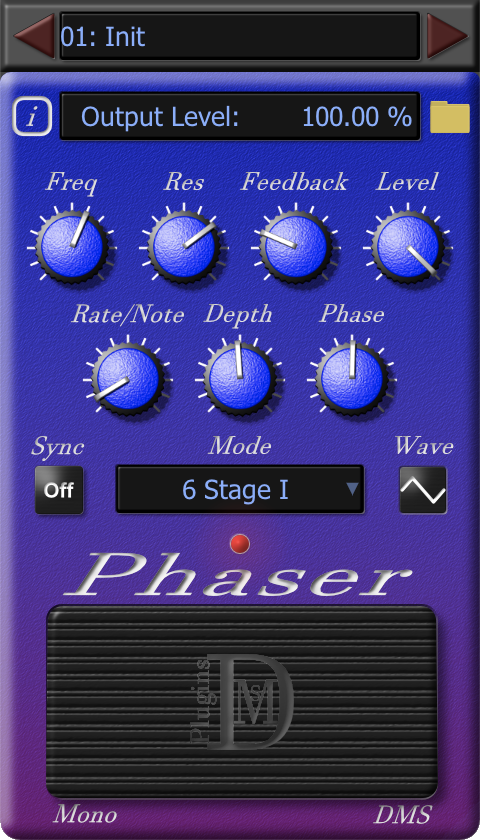
• Preset increment/ decrement buttons – The red triangle shaped buttons at the top of the UI on either side of the preset menu change the currently selected preset by one. The button on the left selects the previous preset. The one on the right selects the next preset.
• Preset menu – Used to select, rename, or create new presets. See Preset Management for detailed information.
• Info button – Opens an “about page” that contains basic information about the plugin. When the information page is open, clicking on the DMS Plugins logo will take you to the DMS Plugins website. Clicking anywhere else on the information page will close it.
• Parameter Value display – Displays the name and value of the last touched knob. It also can be used to edit the currently displayed value.
• Preset file menu – Clicking on the folder shaped icon to the right of the parameter value display opens a menu for preset management/ file operations. See Preset Management for detailed information.
• Freq – Adjusts the lowest phase shift frequency in the phaser’s all-pass filter section.
• Res – Adjusts the resonance of the phaser’s filters. Lower settings are subtle; higher settings are more intense.
• Feedback – Adjusts the phaser’s intensity by controlling the level of processed signal that is mixed back in to the input of the filter section.
• Level –The overall output level of the effect.
• Rate/Note –The rate at which the LFO (low frequency oscillator) completes one cycle of a periodic waveform. When tempo sync is off, this knob controls the LFO rate in Hz. When tempo sync is on, it regulates the LFO rate to correspond to the selected measure or note duration in relation to your DAW’s project tempo and time signature. Note: After enabling Sync or clicking on the Rate/Note knob while in sync mode, you will see “Sync to:” on the left side of the value display and it’s value on the right. Clicking on the value on the value display will open a menu from which you can select a measure or note duration. Of course you can just turn the knob also…… it’s your choice.
• Depth – This knob regulates the range (in Hz) that the all-pass filter section’s phase frequencies are modulated by.
• Phase – Adjusts the location within the waveform generated by the LFO that is considered the “start” of the periodic waveform. When sync is disabled the phase is irrelevant, but when sync is on and you are using DMS Phaser in a DAW with the transport running, the LFO will cycle through its waveform at every sync interval, starting from the same location within the waveform at every sync interval. In DMS Phaser (mono), the Phase knob directly affects both left and right channels. In DMS Phaser (stereo), the Phase knob affects the left channel directly and the right channel indirectly.

• Wave – A switch that cycles the LFO waveform between sine and triangle waves.
• Sync – A switch that turns DMS Phaser’s tempo sync mode on and off. When sync is enabled, DMS Phaser will remain synchronized to your DAW project while it is recording or playing, even during tempo and time signature changes.
• Mode – A menu from which you can select between 2, 4, or 6 stage phaser modes. There are three variations of 4 and 6 stage modes for a total of 7 options.
• Bypass – A switch that causes a whisper quiet transition to and from bypass.
• Resizing handle – Hovering your cursor over the bottom-right corner of the plugin will expose a triangle that when clicked and dragged, will enlarge or reduce the plugin’s size.
Requirements
- Windows 8 (64 bit) or later
- macOS 10.11 or later
- VST compatible host software on both Mac and Windows
- Audio Units compatible host on Mac
